Raz Vape Support: The Ultimate Troubleshooting Hub
Is your Raz vape not hitting? Confused by the screen animations or charging lights? We’ve compiled the most common questions and solutions for the Raz TN9000, DC25000, and LTX 25K to get you back to vaping in no time.
⚡ Charging & Battery Questions.
How do I charge my Raz Vape?
All modern Raz models (TN9000, DC25000, LTX 25K) use a USB Type-C charging port located at the bottom of the device.
- Insert a Type-C cable into the port.
- Plug the other end into a 5V/1A wall adapter or a laptop USB port.
- Important: Avoid using “Fast Chargers” (like MacBook or high-wattage phone bricks), as they can overheat the small 650mAh–800mAh batteries in disposable vapes.
How long does a Raz vape take to charge?
Typically, a Raz vape takes between 45 to 60 minutes to reach a full charge.
- Pro Tip: Don’t leave your vape charging overnight. Unplug it once the battery indicator on the screen shows 100% or the light stays solid green to prolong battery life.
Why is my Raz vape blinking red?
A blinking red light almost always means the battery is dead. If it blinks while you are trying to puff, it’s a safety cutoff letting you know it needs a charge immediately. If it blinks while on the charger, it may indicate a connection issue.
🖥️ Screen & Indicator Meanings
What do the numbers on my Raz screen mean?
Most Raz vapes feature a dual-monitoring system on their HD screens:
- Percentage (%): This is your Battery Level. 100% is full; 0% means it’s time to plug in.
- Droplet Icon/Bar: This represents your E-Liquid Level. When this reaches the bottom or turns red, your juice is low.
My Raz vape shows 0% juice but still tastes fine. Can I keep using it?
The juice indicator is an estimate based on your puff duration. If the screen says 0% but you aren’t getting a burnt taste, you can continue to use it. However, once you notice a “dry” or “burnt” sensation, stop immediately to avoid inhaling singed cotton.
🛠️ Performance Troubleshooting
Why is my Raz vape not hitting (No Vapor)?
If your device is charged but nothing happens when you draw:
- Check the Airflow: Ensure the slider at the bottom isn’t completely closed.
- Clear the Mouthpiece: Sometimes lint from your pocket can clog the airway. Use a toothpick to gently clear any debris.
- Primer Puff: Try taking a few quick, short puffs to “wake up” the sensor.
How do I use “Boost Mode” on the Raz DC25000 or LTX 25K?
These models feature a toggle switch or button.
- Regular Mode: Provides the standard puff count (up to 25,000).
- Boost Mode: Increases wattage for bigger clouds and more intense flavor.
- Note: Using Boost Mode will use up your e-liquid and battery roughly twice as fast.
🧼 Maintenance & Safety
My “Purse Vape” (Raz RYL 35K) is leaking. What should I do?
Leaking is rare but can happen due to extreme temperature changes (like leaving it in a hot car).
- The Fix: Wipe the exterior with a paper towel and blow gently into the mouthpiece to clear any excess juice from the center chimney. Always store your vape upright.
Can I refill a Raz disposable vape?
No. Raz vapes are closed systems designed for one-time use. Attempting to open or refill the device can damage the internal sensors and poses a fire risk. When the juice is gone, please dispose of the device at a designated e-waste recycling center.
Pro-Active Support: The Raz Vape Safety & Battery Care Guide
We want you to get the most—and the safest—experience out of your Raz device. While devices like the Raz DC25000 and LTX 25K are designed with advanced safety features, proper handling is key.
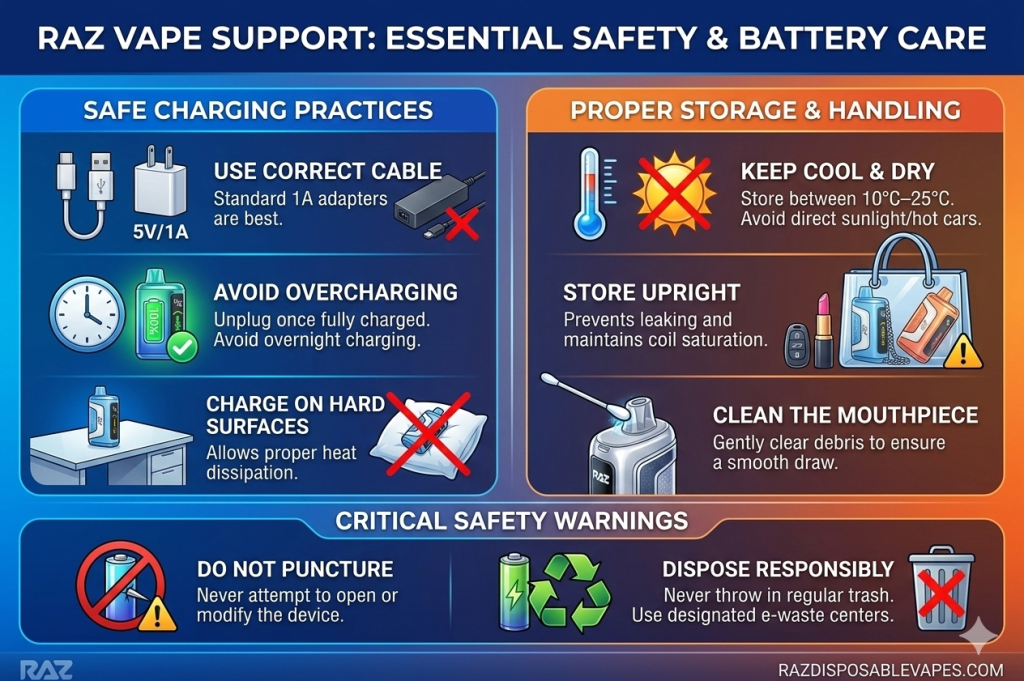
Use this visual guide to ensure your device performs at its peak.
Visual Guide to Vape Safety
The infographic below breaks down essential “Dos and Don’ts” for charging, storage, and usage.
Need a New Raz?
If your device has reached the end of its life, browse our latest arrivals. Shop the New Raz LTX 25K Collection →]